Interactions Correctly?


7 Tag Management Systems for Better Tracking in 2026


Stop Guessing If Your Tags Are Working Validate Them with TrueMeasure
Tags play a crucial role in website and app data collection, helping businesses track visitor behavior,measure conversions, and analyze campaign performance. With the right tags in place, companies gain invaluable insights that drive smarter decisions.
2026 has raised the bar on what "right" means:
Cookie deprecation has pushed teams toward first-party data and server-side tagging
- Consent rules now get enforced in real time, not just documented
- AI-driven personalization and predictive models are only as good as the tracking data feeding them
Managing an ever-growing number of tracking codes was already a burden. Without a scalable system, websites suffer from slow load times, tracking errors, and inconsistent data.
That's where tag management comes in. A Tag Management Solution (TMS) helps organize, deploy, and update tracking tags efficiently, without relying on developers for every change.
But deploying a tag and deploying it correctly aren't the same thing. A Tag Management System will faithfully fire whatever rule you've set up, even if that rule is broken, duplicated, or missing a data layer variable.
On average, 15–30% of interactions across a typical digital estate are mistracked, dark, or unutilized and no TMS is built to catch that on its own. That's the gap Xerago TrueMeasure closes.
In this blog, you'll discover:
- What tag management is and why it matters
- How tag management systems work
- The best TMS platforms for 2026
- Key factors to consider when choosing one
- Why even a well-chosen TMS can still leak data accuracy
By the end, you'll know how to pick the right TMS and how to make sure it stays accurate.
What Is Tag Management?
Tag Management is the process of managing and deploying digital tracking codes (or "tags") on a website or app without requiring manual code changes. These tags are small pieces of JavaScript or pixels used for analytics, marketing, and other tracking purposes. A Tag Management System (TMS), like Google Tag Manager (GTM), Adobe Launch, or Tealium, helps businesses organize and control their tags efficiently. Instead of adding individual tags to the website code, a single tag management container is placed, which then dynamically loads and executes the required tags.
Struggling to Keep Your Tag Management Implementation Accurate?
Xerago TrueMeasure works alongside your TMS (GTM, Adobe Launch, Tealium, and others) to make sure the tags it deploys actually work as intended, not just fire.
- Detects silent tag breaks, misfires, and duplicate events across every page and property
- Diagnoses each issue as Mistracked, Dark Data, or Unutilized, and ties it to business impact
- Fixes the problem automatically, deploying validated corrections straight to your tag manager, no developer needed
As your measurement assurance layer, TrueMeasure doesn't replace your TMS. It makes sure what it deploys stays correct as long after launch.
Book a Demo with Xerago TrueMeasure ->What is Tag Management Solution?
A Tag Management Solution (TMS) is a platform that simplifies the process of managing and deploying tracking codes on a website or app. It allows marketers, analysts, and developers to control when and how tags are fired without needing to modify the website's source code directly.
Tags are small snippets of JavaScript or HTML that collect data and send it to third-party services like Google Analytics, Facebook Pixel, marketing automation tools, A/B testing platforms, and advertising networks. A TMS is essential for businesses that rely on digital marketing, analytics, and customer experience tools, it improves efficiency, accuracy, and scalability while reducing IT workload and enhancing website performance.
What a TMS doesn't do on its own is confirm those tags are still firing correctly once they're live. That's a separate layer, the one Xerago's TrueMeasure is built for.
See What Your TMS Might Be Missing
What a Tag Management doesn't do on its own is confirm those tags are still firing correctly once they're live. That's a separate layer the one Xerago's TrueMeasure is built for.
See what your TMS might be missing ->The broader tag management system market is projected to reach USD 31.21 billion in TAM during 2026–2034, at a CAGR of 12.27%. Source: The Insight Partners
When to Adapt a Tag Management Solutions?
- If you have limited visibility into tag performance, data accuracy, and user behavior tracking.
- Over-reliance on the IT team or developers for tag implementation is a common sign that it’s time to move to a more scalable and centralized tag management system.
- If you aim to broaden your marketing efforts and track additional data beyond basic analytics, modern tag management tools support integration with 3rd party tag management platforms and other martech systems.
- When existing marketing solutions are restrictive, you need a more dynamic tag management approach—one that allows for rapid deployment, modification, and removal of tags to match evolving strategies and requirements.

Why Enterprise Businesses Need Robust Tag Management
Managing tags across a handful of pages is straightforward. Managing them across dozens of properties, multiple agencies, and years of accumulated campaigns is not — complexity compounds, and basic tagging tools weren't built for it.
Tag Enterprise platforms answer this with server-side tagging, real-time data orchestration, and consent governance as the infrastructure needed to stay compliant with GDPR, CCPA, and similar laws at scale.
But infrastructure alone doesn't guarantee accuracy. A robust TMS helps teams collaborate, move faster, and stay organized; it doesn't guarantee that what's actually firing across your container is still correct six months later. That's a separate problem, and it's the one Xerago TrueMeasure is built to solve: verifying that the tags your TMS deploys are still working as intended, long after launch.
Top Tag Management Platforms/Solutions for 2026
As businesses adopt more advanced data strategies, choosing the right tag management platforms becomes critical. These solutions offer scalable, integrated capabilities that simplify tracking across websites, mobile apps, and third-party systems.
Here’s a curated list of the top seven tag management platforms currently leading the market:
- Adobe Dynamic Tag Management
- Google tag manager
- Tealium IQ
- Tag commander
- Ensighten Manage
- Qubit
- Piwik PRO Tag manager
The One Thing None of These Platforms Do
GTM, Adobe Launch, Tealium, and the rest of this list are excellent at deploying tags. None of them are built to verify that a tag fired the way it was supposed to, that a data layer variable passed the right value, or that a "form submit" event wasn't actually counting a page load.
Tealium has about 0.62% market share, and Piwik PRO about 0.25%, showing how concentrated the market is around GTM. 6sense
That's not a criticism of these tools, it's outside their job description. Analytics platforms and tag managers are built to analyze and execute, not to audit themselves.
Xerago's TrueMeasure is built specifically for that gap. It sits alongside your existing TMS GA4, Adobe Analytics, GTM, Adobe Launch, Tealium and continuously detects, diagnoses, and automatically fixes broken tags, missing events, and duplicate conversions, without replacing any part of your current stack.
Let's explore each TMS in detail and how it helps with tagging
1. Adobe Experience Platform (Previously Adobe Launch)
Adobe Experience Platform Launch, formerly Adobe Dynamic Tag Management, helps businesses efficiently deploy and manage website tags while integrating seamlessly with Adobe products. Originally introduced as a dynamic tag management solution, the platform has since evolved into a modern system that supports real-time, rules-based tag execution.
Designed for enterprise users, it simplifies tag implementation, enhances flexibility, and ensures accurate data collection. This tool empowers teams to optimize their digital experiences with advanced capabilities, making tag management more efficient and reliable.

Key Features:
- Rule Builder:Create complex tagging rules using an intuitive drag-and-drop interface.
- Open API Architecture:Integrate with various third-party solutions for extended functionality.
- Extension Library:Utilize a wide range of pre-built extensions to enhance tag management capabilities.
- Custom Event Triggers: Set specific conditions to trigger tags based on user interactions.
- Debugging Tools:Test and troubleshoot tags before deploying them live.
| Pros | Cons |
|---|---|
| Simplifies the tag deployment process, reducing dependency on IT teams. | Can be complex and overwhelming for beginners. |
| Seamless integration with Adobe's marketing and analytics products. | Requires familiarity with Adobe's ecosystem for optimal use. |
URL: https://experienceleague.adobe.com/docs/launch.html
As an Adobe Experience Platform solution provider, Xerago ensures your tagging infrastructure is implemented right the first time and stays that way.
2. Google Tag Manager (GTM)
Google Tag Manager (GTM) is a powerful solution that simplifies tag deployment for websites and mobile apps, allowing marketers and administrators to manage tracking codes without altering the underlying code. It enhances workflow efficiency, improves data accuracy, and streamlines marketing operations, making it an essential tool for businesses looking to optimize their online presence.

Key Features:
- Asynchronous Tag Loading:Ensures that tags load independently, preventing delays in page load times.
- Multi-Account Support:Manage multiple accounts and containers from a single interface, making it easier to handle different projects.
- Server-Side Tagging: Enhance security and performance by moving tag execution to a server environment.
- Built-in Templates:Use pre-built templates for common tags like Google Analytics, AdWords, and more.
- Preview and Debug Mode:Test and troubleshoot tags before publishing them live.
| Pros | Cons |
|---|---|
| Easy and quick setup process, even for non-technical users. | Limited customization options for advanced technical users. |
| Versatile handling of various tags, including third-party tags. | May require some learning curve for beginners to understand advanced features. |
URL: https://marketingplatform.google.com/about/tag-manager/
Note: GTM manages deployment well, but it won't tell you if a tag silently breaks after a redesign; that's the gap Xerago's TrueMeasure is built to close.
3. Tealium IQ
Tealium Tag Management System is built for enterprise teams that need flexibility, scale, and real-time control across their digital properties. It streamlines tag deployment, integrates with hundreds of vendors, and supports advanced privacy controls—making it a trusted solution for businesses with complex data needs.

Key Features:
- Tag Marketplace:Access 1,000+ vendor integrations to support diverse martech stacks.
- Data Layer API:Manage and control the flow of data across your digital ecosystem for better data accuracy.
- Real-Time Data Collection:Capture interactions as they happen for faster, smarter decision-making.
- AudienceStream Integration:Combine with Tealium's Customer Data Platform for advanced audience segmentation and targeting.
- Privacy and Compliance:Ensure compliance with global data privacy regulations through built-in features.
| Pros | Cons |
|---|---|
| High scalability and robust performance metrics. | Can be overwhelming and complex for small businesses with limited resources. |
| Extensive vendor integrations and a user-friendly interface. | Higher cost compared to some other tag management tools. |
URL: https://tealium.com/products/tealium-iq-tag-management-system/
Xerago helps enterprises deploy Tealium IQ at scale, connecting 1,000+ vendor integrations into a clean, accurate data layer.
4. Tag Commander
Designed for privacy-conscious businesses, this tag management solution ensures compliance with data protection regulations while optimizing tag deployment. It streamlines data collection across websites and mobile apps, enhances security, and provides robust control over tagging processes, making it a valuable asset for organizations focused on privacy and performance.

Key Features:
- Consent Management:Built-in features to manage user consent and ensure compliance with privacy regulations like GDPR.
- Tag Sequencing:Control the order in which tags fire to optimize performance and data accuracy.
- Mobile App Support:Extend tag management capabilities to mobile applications for consistent data collection across platforms.
- Dashboard and Reporting:Gain insights into tag performance and data collection through comprehensive reporting tools.
- User Permissions:Control access and permissions for different team members to manage tags securely.
| Pros | Cons |
|---|---|
| Strong emphasis on privacy compliance and data security. | Limited support for third-party integrations compared to other tools. |
| User-friendly interface for easy tag deployment and management. | May require some learning curve to fully utilize advanced features. |
URL: https://www.commandersact.com/en/solutions/tagcommander/
Xerago implements Tag Commander with built-in consent management, ensuring privacy-compliant tagging from day one.
5. Ensighten Manage
Built for organizations with strict data privacy requirements, this solution ensures secure data collection and seamless integration with marketing technologies. It enables omnichannel tracking, enhances mobile engagement analytics, and provides robust privacy controls to comply with regulations like GDPR and CCPA, making it a trusted choice for businesses prioritizing data security and compliance.

Key Features:
- Omnichannel Data Collection:Gather data from various channels, including web, mobile, and offline, for a comprehensive view of user interactions.
- Mobile App Engagement Tracking:Track user interactions within mobile applications to optimize mobile experiences.
- Robust Data Privacy Controls:Ensure data security with reliable data centers and privacy features to comply with regulations like GDPR and CCPA.
- Dynamic Tag Creation:Create and manage tags dynamically based on user behavior and interactions.
- Seamlessly integrate with existing marketing technologies to enhance data collection and analysis.
| Pros | Cons |
|---|---|
| High level of security and compliance with data privacy regulations. | Can be expensive for small businesses with limited budgets. |
| Seamless integration with existing marketing technologies. | May require technical expertise for initial setup and configuration. |
URL: https://www.ensighten.com/products/tag-management/
Xerago deploys Ensighten Manage across web, mobile, and offline channels, keeping omnichannel tracking secure and compliant.
6. Qubit OpenTag
Qubit OpenTag empowers businesses with advanced tag management capabilities, designed to support experimentation, personalization, and testing. As a flexible Opentag platform, it enables marketing teams to implement and manage tags efficiently especially in A/B testing environments where agility and precision matter.
This tag management solution offers seamless integration with Qubit’s experimentation tools, allowing you to activate campaigns quickly and collect real-time insights. Whether you’re optimizing customer journeys or testing different user flows, Opentag ensures performance tracking without compromising site speed.

Key Features:
- AB Testing Integration:Seamlessly integrate with Qubit's AB testing platform to optimize website performance and user experience.
- Extensive Tag Library:Access a wide range of tags for various marketing needs, including third-party tags.
- User-Friendly Interface:Manage and update tags easily without requiring advanced technical skills.
- Custom Event Triggers:Set specific conditions to trigger tags based on user behavior and interactions.
- Real-Time Reporting:Gain insights into tag performance and data collection through real-time reporting tools.
| Pros | Cons |
|---|---|
| Customizable solutions to meet unique business needs. | Limited support for non-AB testing features and advanced customization |
| Strong support for experimentation and data-driven decisions | Higher cost compared to some other tag management tools |
URL: https://www.qubit.com/products/opentag/
Xerago configures Qubit OpenTag to power A/B testing and personalization without sacrificing site speed.
7. Piwik PRO Tag Manager
Piwik PRO Tag Manager is designed for organizations that prioritize data privacy and regulatory compliance while managing website tags efficiently. It provides a user-friendly environment that simplifies tag deployment, enabling marketers to maintain control over data collection without deep technical expertise. With a focus on security and structured tag execution, it helps businesses optimize performance while ensuring adherence to global privacy standards.

Key Features:
- Consent Management:Built-in features to manage user consent and ensure compliance with privacy regulations like GDPR.
- Tag Sequencing:Control the order in which tags fire to optimize performance and data accuracy.
- Mobile App Support:Extend tag management capabilities to mobile applications for consistent data collection across platforms.
- Dashboard and Reporting:Gain insights into tag performance and data collection through comprehensive reporting tools.
- User Permissions:Control access and permissions for different team members to manage tags securely.
URL: https://piwik.pro/tag-manager/
Xerago TrueMeasure sets up Piwik PRO Tag Manager for privacy-first, GDPR-compliant tag deployment across your stack.
Which Tag Management System Is Right for You?
Different industries have different data needs, compliance requirements, and user expectations. Choosing the right tag management system isn't just about features; it's about how well it fits your business environment.
Here's how some of the top tag management platforms align with real-world use cases:
- For privacy-first industries like healthcare, government, and finance, platforms such as Ensighten and Piwik PRO are designed with strict compliance and data governance in mind. They offer strong consent management, audit controls, and enterprise-grade security.
- For eCommerce and media companies focused on agility and campaign velocity, pairing Google Tag Manager with a governance layer like ObservePoint provides real-time control over tag firing, ideal for optimizing customer journeys and delivering personalized experiences at scale.
- For SMBs and marketing teams without heavy IT support, Google Tag Manager (GTM) offers a lightweight, easy-to-use interface that supports fast deployment and seamless integration with common martech tools.
- For large enterprises managing complex data environments, customer data platforms, and global properties, solutions like the Tealium Tag Management System and Adobe Experience Platform Tags provide advanced orchestration, scalability, and deep integration with analytics and experience platforms.
Whichever platform you choose, the accuracy of what it collects still depends on tags being implemented correctly, and staying correct as your site changes. That's a separate problem from which TMS you pick, and it's one Xerago's TrueMeasure is purpose-built to solve.
How a Tag Management Solution Works in Real-Time
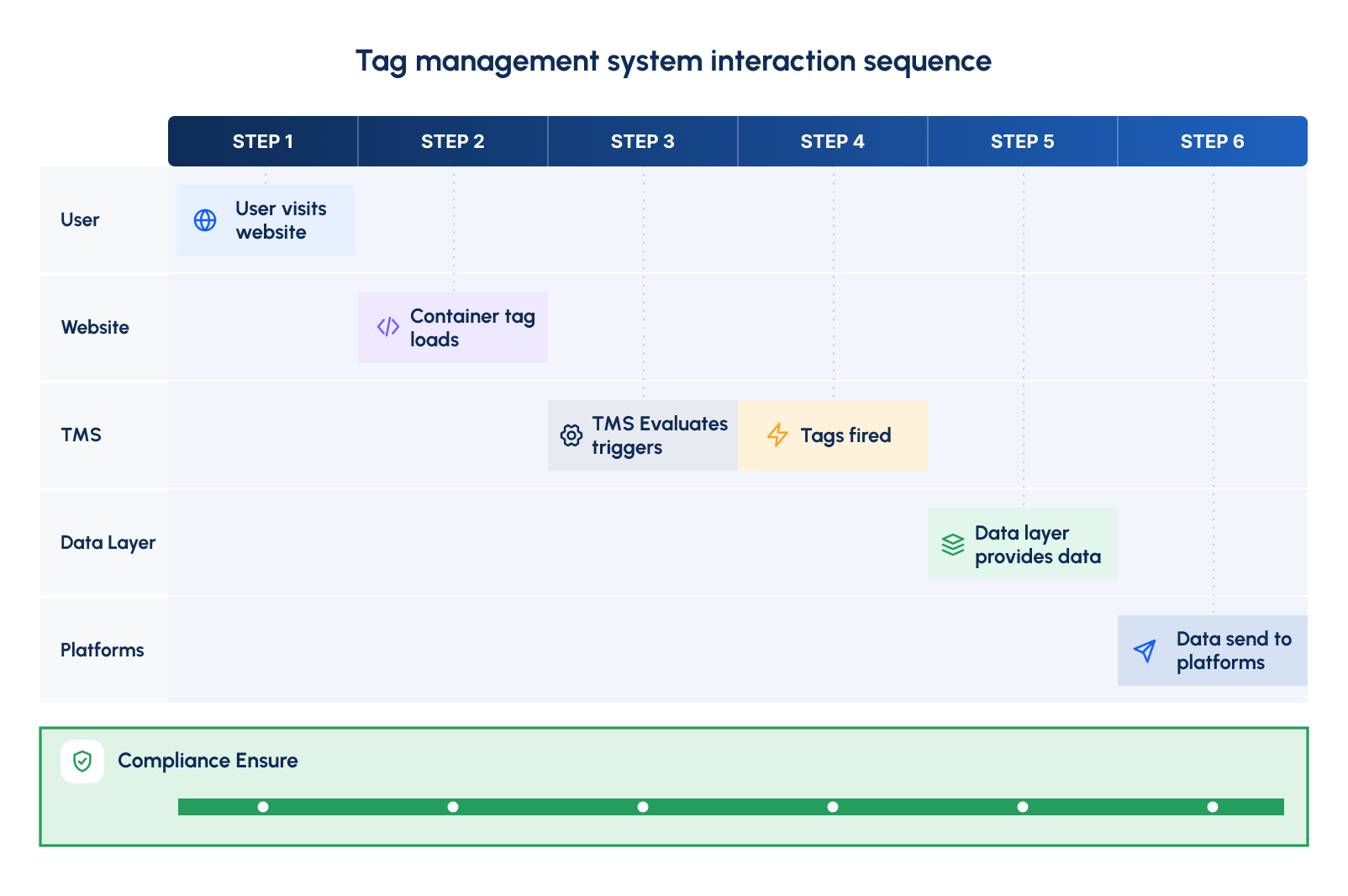
- When someone lands on a webpage, the TMS container tag (a small piece of code) instantly activates in the background.
- Once the Tag Management System (TMS) is activated, it checks a set of predefined rules to determine what needs to happen. Should it track this visit? Should a tag fire when the user watches a video? Or should it wait until they click a button?
- As the visitor scrolls, clicks buttons, or fills out a form, the TMS decides which tracking tags need to be executed. For example, if they click on a "Buy Now" button, a conversion tracking tag fires to record the purchase.
- Behind the scenes, the data layer is continuously storing and organizing key details—such as the current page, the user’s device type, or the items they’ve added to their cart. This ensures that each tracking tag receives the right information without manually scanning the webpage every time.
- Once the tags fire, they send collected data to various platforms. Google Analytics logs the session, Facebook Pixel records an ad conversion, and CRM systems update customer profiles.
- If a user has denied tracking permissions (such as disabling cookies), the TMS ensures that restricted tags do not fire. This helps businesses stay compliant with privacy regulations like GDPR and CCPA while respecting user preferences.
Beyond Deployment: Verifying What Your Tags Actually Track
Even a well-configured TMS can silently leak accuracy over time, a redesign changes a button's class name, a new checkout step never gets tagged, a form-submit event fires twice. Your TMS won't flag any of this; it will just keep executing the rule as written.
Xerago's TrueMeasure addresses this in three steps:
- Detect: Scans every page, interaction, and tag across your digital estate to map what's tracked, what's missing, and what's measured incorrectly.
- Diagnose: Categorizes every issue as Mistracked, Dark Data, or Unutilized, and ties each one to its business impact.
- Fix: With your approval, automatically deploys the correct fix to your existing tag manager and validates it post-deployment — no developer required.
It's available in three tiers depending on how hands-off you want the process: Clarity (one-time audit), Control (scheduled audits for teams shipping pages frequently), and Conquer (continuous audit-and-auto-fix)
7 Factors to Consider When Choosing a Tag Management Solution
- Ease of Use & Deployment – A TMS should have a user-friendly interface that allows marketers to manage tags without relying heavily on developers. Quick deployment and easy updates ensure efficiency in tracking implementation.
- Integration with Marketing & Analytics Tools – The solution should seamlessly connect with platforms like Google Analytics, Facebook Pixel, and CRM systems. It should also support both client-side and server-side tracking for comprehensive data collection.
- Performance & Website Speed – A good TMS ensures that tags load efficiently without slowing down your website. It should support asynchronous tag execution to maintain site speed and avoid conflicts between different scripts.
- Data Layer Support & Flexibility – The system should effectively handle structured data, allowing businesses to capture and use custom event data. A flexible TMS enables dynamic updates to tracking conditions based on user interactions.
- Compliance & Privacy Controls – Given strict privacy laws like GDPR and CCPA, the TMS should include built-in consent management and the ability to block unauthorized tracking. Audit logs and permission settings help maintain compliance.
- Scalability & Multi-Site Support – If your business operates multiple websites, subdomains, or mobile apps, the TMS should support them all under a unified system. It should also handle high-traffic volumes without performance issues.
- Tag Debugging & Error Handling – Real-time debugging tools and built-in error reporting ensure smooth tracking. The system should make it easy to troubleshoot issues, validate tags before publishing, and receive alerts when errors occur.
Where Xerago's TrueMeasure Fits Into All Seven Notice that every factor above is really asking the same underlying question: is what you deployed actually working as intended? A TMS can check every one of these boxes on paper and still leave that question unanswered six months after launch.
Xerago's TrueMeasure closes that gap directly:
- Ease of Use → Automated SDR Creation instantly generates Solution Design Reference documents from your chosen business goals and KPIs, so implementation starts from a clear spec instead of a developer's best guess.
- Integration & Data Layer → Seamless Tagging Automation goes from business goals to live tags with developer-free, data-layer-driven automation, so integrations stay consistent instead of drifting per team.
- Debugging & Error Handling → Smart Validation Engine runs automated page scans and real-time payload checks continuously, catching accuracy issues long after the "it fired successfully" debug message.
- Scalability & Compliance validation runs across every property in your digital estate, not just the one that was last tested, so accuracy holds as you scale.
To fix these XeragoTrueMeasure automates and optimizes digital analytics implementation end to end from business planning to tag validation removing weeks of manual effort for analytics teams and consultants.
Conclusion
As websites became more complex, the need for a faster, more scalable solution grew which is how Google Tag Manager, Tealium, and Adobe Launch came to dominate the space. But deploying tags at scale has created a second, quieter problem: verifying that all of them still work. Businesses are increasingly pairing their TMS with an automated verification layer like Xerago's TrueMeasure, so that server-side tagging, AI-driven analytics, and every other downstream initiative is built on data that's actually accurate.
Ram Prabhakar
Head of Solutions and Content
Xtelligence Inbox.
Your weekly dose of marketing smarts!
Related Posts


Digital Analytics
Real-Time Personalization Is Losing You Conversions. Here Is How to Take Them Back.

















Digital Analytics
Customer Segmentation: Using Predictive & Adaptive Models for Targeted Marketing