Interactions Correctly?


Adobe Analytics Guide: A Deep Dive into Features You Might Have Missed


The Ultimate Guide to Adobe Analytics Features You Might Miss
Did you know that between 60% and 73% of all data within an enterprise goes unused for analytics? That’s what a Forrester report revealed, shining a spotlight on a massive missed opportunity for businesses. While data is being collected in ever-increasing volumes, much of its potential to drive strategic decisions remains untapped.
The challenge isn’t just about having the data—it’s about knowing how to turn it into meaningful insights. That’s where Adobe Analytics comes in. As one of the most sophisticated tools for tracking user behavior, Adobe Analytics offers the potential to transform your data into a powerful asset. But many organizations only scratch the surface of what it can do.
This Adobe Analytics guide isn’t about the basics. Instead, we’re focusing on the features and techniques that often go overlooked—the ones that can unlock more value from your data, streamline your processes, and take your analytics strategy to the next level.
It’s time to make sure no data goes to waste. Let’s explore how Adobe Analytics can help you do just that. But before that, let’s get started with understanding its core features, benefits of implementing Adobe Analytics and how it can optimize your digital presence?
Adobe Analytics Core Features and Benefits
At its core, Adobe Analytics is a digital analytics platform that helps businesses track and understand how users interact with their websites, mobile apps, and other digital properties. It translates complex user behaviour into actionable insights, enabling organizations to refine their strategies and improve customer experiences.
Key Benefits of Implementing Adobe Analytics
The impact of using Adobe Analytics effectively can be felt across every aspect of your business:
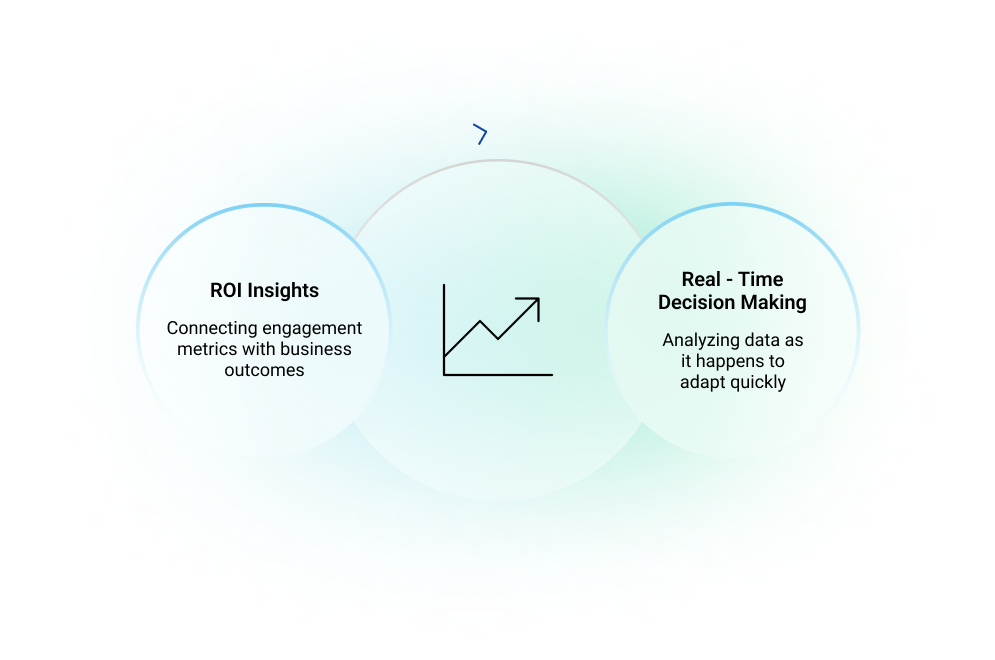
Adobe Analytics provides clarity and control over your data, helping businesses make well-informed decisions. With real-time responsiveness, you can monitor user behaviour as it happens, allowing for timely adjustments that keep your strategies relevant and effective.
Moreover, its robust ROI tracking ensures you understand exactly how your marketing investments are performing, making it easier to prioritize efforts that drive meaningful results.
When used wisely, Adobe Analytics doesn’t just tell you what happened - it helps you understand what to do next.
Core Features of Adobe Analytics You Should Know
Many organizations implement Adobe Analytics for its well-known capabilities, but its true strength lies in the specialized solutions and use cases it offers, unlocking deeper insights and untapped potential.
Data Collection and Customization Options
Adobe Analytics gathers a wide range of data: clicks, page views, events, conversions - you name it. But what sets it apart is the ability to customize how you collect and structure that data using its native Dynamic Tag Management layer.
Let’s say you’re tracking a sales funnel. You can define custom variables to focus on specific actions, like how many users click a "Request a Demo" button versus those who download a whitepaper. This kind of granular tracking helps you zoom in on the metrics that matter most to your goals.
Real-Time Reporting Capabilities
The ability to access live data is a game changer for marketing teams. For example, if you’re running a flash sale, real-time reporting allows you to monitor performance and make quick adjustments. Did traffic suddenly spike? Did one promotional channel outperform the others? Having this information immediately can make the difference between hitting or missing your targets.
Hidden Gems in Adobe Analytics: The Lesser Known Features
Beyond its core functionalities, Adobe Analytics offers several other features that can give your business a competitive edge.
These Adobe Analytics capabilities are often overlooked but can bring clarity and efficiency to your data analysis efforts.
Virtual Report Suites
Imagine you have multiple teams - marketing, product, and sales - all needing access to data, but each with a unique focus. Virtual report suites let you create tailored data views for specific needs without duplicating datasets.
For instance, the marketing team can have a report suite that highlights campaign performance, while the product team gets insights into feature adoption rates. This segregation simplifies analysis and ensures everyone has the right data at their fingertips.
Without virtual report suites, teams often waste time sifting through irrelevant metrics or stepping on each other’s toes in shared datasets. This feature not only streamlines collaboration but also prevents data overload.
Analysis Workspace
If you’re still relying on basic dashboards to visualize data, you’re missing out. The Analysis Workspace is where Adobe Analytics truly shines. It offers drag-and-drop tools and customizable templates that make complex data easier to interpret—especially when paired with structured content strategies powered by Adobe AEM CMS.
For example, you can build a funnel visualization to see where users drop off in their journey or use heat maps to identify the most clicked areas on your website. The flexibility is immense, and yet, many businesses only scratch the surface of what’s possible here.
Experiment with less commonly used templates, like segmentation overlap reports or cohort analysis, to uncover insights about user behaviour patterns over time.
Intelligent Alerts and Anomaly Detection
Sometimes, it’s not what you see in the data but what you don’t expect that’s most important. Adobe Analytics uses artificial intelligence to identify anomalies -unexpected spikes or drops in metrics and sends alerts in real time.
Picture this: You launch a new campaign, and within hours, an alert notifies you of an unusually high bounce rate. Instead of waiting for the weekly report, you can investigate immediately, saving the campaign from potential failure.
This feature is particularly valuable for catching subtle issues that might otherwise slip through the cracks, like seasonal traffic changes or errors in your tracking setup. Many of these automation capabilities are being mirrored and enhanced in recent AEM features, making it easier to streamline both content management and analytics workflows.
Cross-Device Tracking
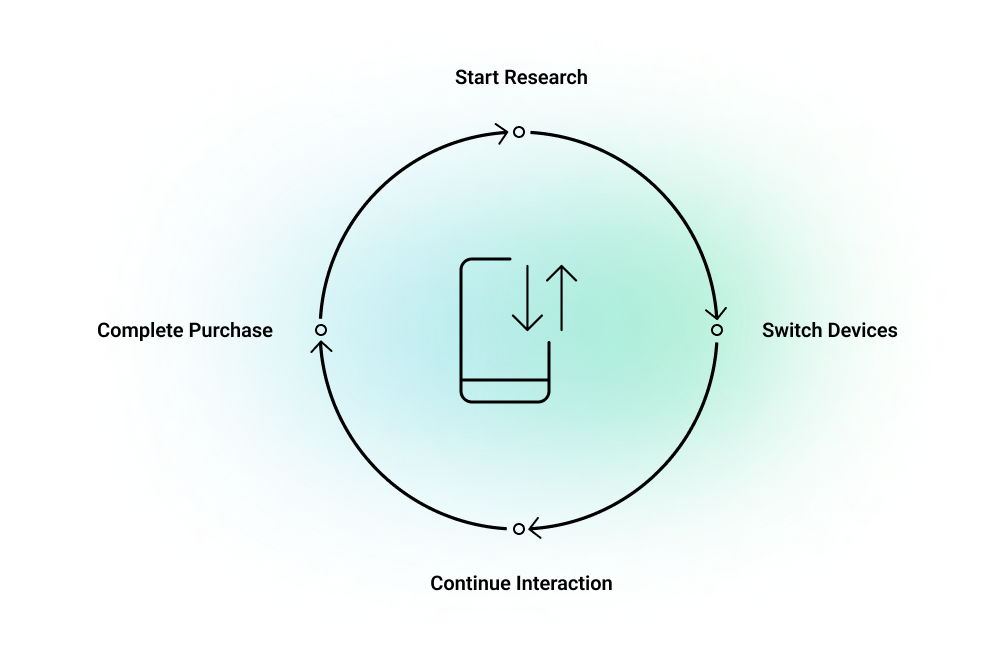
Your customers don’t live on one device, and neither should your analytics. Cross-device tracking allows you to follow user behaviour seamlessly as they switch between a desktop, mobile, or tablet.
For example, a customer might start researching your product on their phone during a commute, but complete the purchase on a desktop later in the day. Without cross-device tracking, these actions could appear as unrelated events, making it difficult to understand the full journey.
Implementation Tips:
- Use consistent identifiers, like login credentials or customer IDs, to link actions across devices.
- Test your tracking setup frequently to ensure accurate data collection across platforms.
Understanding these patterns can inform decisions like optimizing the checkout experience or timing follow-up communications.
Tips for Maximizing the Value of Adobe Analytics Features
Even with powerful tools at your disposal, getting the most out of Adobe Analytics requires strategic use of its features. Partnering with an experienced Adobe Analytics consulting team can help you unlock its full potential and ensure implementation, integration, and reporting are aligned with business goals.
Leveraging Integration with Other Tools
Adobe Analytics doesn’t operate in isolation. By integrating it with tools like Adobe Experience Manager, Adobe Target or Adobe Customer Journey Analytics, you can unlock more potential that save time and improve results.
For example, Adobe Experience Manager services can pull insights from Adobe Analytics to automatically serve personalized content based on user behaviour. Similarly, integrating with Adobe Target allows for seamless A/B testing, where you can analyze test results directly within Analytics.
The advantage?
You eliminate data silos and create a smoother flow from insight to action.
Using Segments for Granular Insights
Segmentation is one of the most powerful features in Adobe Analytics, yet it’s often underused or misused. Building advanced segments lets you focus on specific user groups, such as first-time visitors, high-value customers, or those who abandoned carts.
For example:
- Analyze how users from specific traffic sources behave differently.
- Create a segment of customers who browsed products but didn’t add anything to their cart, then target them with retargeting campaigns.
By drilling down into these details, you gain clarity on what drives or deters user actions.
Automating Reports for Efficiency
Manually pulling reports is a productivity killer. Adobe Analytics allows you to automate report generation and share insights across teams effortlessly. Integrating Adobe Analytics Power BI workflows enables even more powerful visualizations and real-time executive dashboards, bridging the gap between raw data and strategic reporting.
- Schedule delivery: Set up weekly or monthly reports for stakeholders so they’re always up-to-date.
- Tailor content: Customize reports for different teams, ensuring everyone gets the data relevant to their goals.
Frequently Overlooked Use Cases of Adobe Analytics
Even seasoned users of Adobe Analytics might not realize its full potential. Many advanced capabilities require expert configuration, which is where professional Adobe Analytics implementation services can make all the difference in ensuring these overlooked features are fully leveraged.
Let’s explore some innovative Adobe Analytics benefits and applications that can bring fresh value to your analytics efforts.
Audience Segmentation for Campaign Personalization
Personalization isn’t just a buzzword - it’s an expectation. Adobe Analytics enables you to use behavioural data to build precise audience segments, helping you deliver tailored messages to the right people—especially when integrated with Adobe Target services for seamless testing and delivery of personalized experiences.
For instance, instead of sending a generic email blast, you can segment your audience by browsing behaviour. Customers who viewed your premium products might receive an offer for free consultations, while frequent visitors to your blog could get a curated guide based on their reading history.
Personalized campaigns have higher engagement and conversion rates. Use segmentation to move away from “one-size-fits-all” strategies.
Attribution Modelling and ROI Analysis
Attribution modelling is critical for understanding which marketing channels drive results. Adobe Analytics goes beyond basic last-click attribution to provide detailed conversion path analysis.
For example, you might discover that paid social ads generate the most awareness, while email campaigns drive the final purchase. With this insight, you can allocate your budget more effectively and refine your messaging for each channel.
Marketing success isn’t just about individual channels; it’s about how they work together. Adobe Analytics helps you see the bigger picture and make informed decisions. This is one of the unique offerings from Adobe Solutions, enabling a holistic approach to data-driven marketing
Conclusion
Adobe Analytics is a comprehensive platform that extends far beyond basic tracking capabilities. It offers robust tools for real-time reporting, customization, and cross-device tracking, allowing businesses to gain deep insights into customer behaviour. The platform’s hidden features, such as virtual report suites and anomaly detection, simplify collaboration and help identify unexpected trends.
With advanced tracking and, Adobe Analytics provides a holistic view of user behaviour, bridging the gap between online and offline interactions.
By leveraging integrations, segmentation, and automation, businesses can maximize efficiency and return on investment, ensuring they extract the full value from this powerful tool.
Ashvini SK
Senior Content Writer
Xtelligence Inbox.
Your weekly dose of marketing smarts!
Related Posts


Digital Analytics
Real-Time Personalization Is Losing You Conversions. Here Is How to Take Them Back.

















Digital Analytics
Customer Segmentation: Using Predictive & Adaptive Models for Targeted Marketing