Interactions Correctly?


Adobe Target A/B Testing Setup Types and Best Practices


Not Sure Where to Start With Adobe Target A/B Testing?
Customers now expect every interaction. Adobe Target A/B testing compares two or more digital experiences to measure which improves a defined outcome, such as completed purchases or qualified leads. A useful test starts with a clear hypothesis, enough eligible traffic, and reliable conversion tracking.
Adobe Target empowers brands to achieve this through AI-driven automation, A/B testing, and advanced personalization, optimizing every customer interaction.
How do you set up an Adobe Target A/B test, choose the right activity type, and decide when the results are reliable enough to act on?
This guide covers Adobe Target setup, manual A/B testing, multivariate testing, Auto-Allocate, Auto-Target, and the sample-size and. measurement checks needed before you roll out a winning experience.
What Is Adobe Target? (Formerly known as Adobe Test & Target)
Adobe Target is a powerful personalization and testing tool designed to help businesses create tailored digital experiences for their customers. Part of Adobe’s Experience Cloud, it enables you to experiment with and optimize your website, mobile apps, and other digital platforms to boost engagement and conversions.
It has two main versions: Target Standard, which provides basic testing and targeting features, and Target Premium, which offers more advanced capabilities.
Whether you're testing button colors or personalizing entire user journeys, Adobe Target empowers you to understand your audience better and deliver the right experiences at the right time. It’s the ultimate tool for businesses looking to enhance customer engagement and drive results.
Adobe Test & Target is the former name of Adobe Target. Adobe Analytics provides measurement and analysis, while Target delivers the test experiences. Use Adobe Campaign or Marketo Engage for email subject-line tests.
How Does Adobe Target A/B Testing Work?
Adobe Target’s A/B testing involves comparing two or more versions of a webpage or app experience to determine which performs better against your selected success metric.
Adobe Target streamlines this process by offering intuitive tools to test and optimize key elements like landing pages, checkout flows, and marketing messages.
With Adobe Target, you can:
- Analyze how reducing checkout form fields impacts purchase completion rates.
- Test whether adding testimonials to product pages increases conversions.
- Measure whether a campaign landing page with a video thumbnail increases completed sign-ups.
Here’s how A/B testing works in Adobe Target:
Develop a hypothesis to test. For example:
- Increasing the font size of the headline will improve engagement.
- Replacing a static product image with a rotating carousel will boost click-through rates.
- Choose a single variable to test and create versions. For example:
- Testing two CTA buttons: one saying “Get Started” and another saying “Learn More.”
- Comparing two landing-page headlines for visitors arriving from the same email campaign.
Let Adobe Target manage the test. It might serve:
- Different banner images on a website to analyze which draws more clicks.
- Two versions of a pricing page—one with tiered pricing and another with a single flat rate.
- Use Adobe Target’s insights to make decisions. For example:
- If a shorter form improves completed submissions without reducing lead quality, validate the result on other landing pages before extending the change.
- If an animated landing-page visual outperforms a static image, check page performance and conversion quality before using it elsewhere.
- Take advantage of features like multi-armed bandit testing. For instance:
- Test multiple discount offers (10%, 15%, and 20%) to see which drives the highest sales.
- With Target Premium, include product recommendations in an A/B activity to test their effect on purchases or revenue.
How to Set Up an Adobe Target A/B Test
- Confirm that Adobe Target is implemented on the test page through a supported integration, such as at.js or Adobe Experience Platform Web SDK. For Web SDK, check the datastream configuration, experience rendering, and display and conversion event collection.
- In Activities, select Create Activity > A/B Test. Use the Visual Experience Composer for supported page edits, or the Form-Based Experience Composer when a visual editor is unsuitable.
- Keep Experience A as the control and create Experience B with the proposed change. Name the activity so the page, hypothesis, and primary outcome are clear.
- Define the eligible audience and traffic allocation. Start with manual allocation when the purpose is to compare experiences over a planned test period.
- Choose the reporting source and primary success metric. If using A4T, confirm the correct report suite and conversion definition.
- Preview every experience using activity QA links. Check desktop and mobile rendering, audience eligibility, and whether the intended conversion is recorded once. Resolve broken experiences or missing events before activation.
Adobe Target Capabilities and Features
Adobe Target offers several advanced A/B testing capabilities that help businesses fine-tune their digital experiences:
Imagine you're running an online store, and you want each visitor to feel like the website was designed just for them. Adobe Target helps you test different versions of your site and show personalized content to each user.
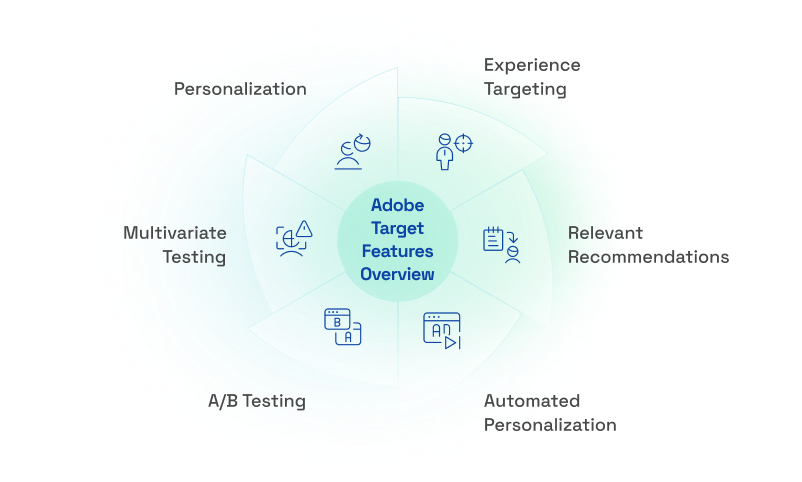
Key Features:
- A/B Testing: Think of this as trying out two different outfits to see which one gets more compliments. You can display two versions of a webpage to visitors and see which one they prefer, helping you make informed decisions.
- Multivariate Testing: Instead of just two outfits, imagine mixing and matching different shirts, pants, and accessories to find the best combination. This feature lets you test multiple elements on your page simultaneously to discover the most effective mix.
- Personalization: It's like greeting a regular customer by name and showing them products they might like. Adobe Target allows you to tailor content based on a visitor's behavior, location, or preferences, making their experience more relevant.
- Automated Personalization: Imagine having a smart assistant who learns each customer's likes and dislikes, then automatically shows them the most appealing products. This feature uses machine learning to deliver personalized content to each visitor.
- Relevant Recommendations: Ever noticed how streaming services suggest movies you might like? Adobe Target can do the same for your products, recommending items based on what similar users have viewed or purchased.
- Experience Targeting: It's like setting up different window displays for different types of shoppers. You can create specific content for particular audience segments, ensuring the right message reaches the right people.
What Elements Could You Test with Adobe Target A/B Testing?
Adobe Target allows you to optimize elements across your web pages and app experiences through A/B testing. Email subject-line and send-level testing belongs in the email platform, such as Adobe Campaign or Marketo Engage. Here’s what you can test on a Target-enabled experience:
| Element | What to Test | Examples |
|---|---|---|
| Titles & Headlines | Test visible page headlines against engagement or conversion goals. Adobe Target is not a tool for measuring organic ranking changes. | “Save Big Today!” vs. “Exclusive Deals for You” |
| Calls to Action (CTAs) | Experiment with phrases, placement, or button design to boost conversions. | “Shop Now” vs. “Learn More” vs. “Get the Free Guide” |
| Landing Pages | Optimize performance by testing layouts, benefits, CTAs, and social proof. | Testing headlines like “The Ultimate Solution” vs. “Your Trusted Partner” |
| Images | Assess the impact of visuals on user engagement. | Real-life photos vs. product photos; colorful palettes vs. minimalistic styles |
| Forms | Minimize abandonment by testing form length, progress bars, or button copy. | “Submit” button text vs. “Get My Quote” |
| Navigation Menus | Evaluate how users interact with your menu and adjust for better usability. | Placement of navigation (top vs. side), number of items, or even removing it altogether |
| Campaign Landing Page Headlines | Test message relevance after visitors click through from a campaign. | Explore Your Options” vs. “Find the Right Plan” |
| Copy | Refine your message by testing length, tone, and formatting. | Casual vs. formal tone, short paragraphs vs. bullet points |
| Page Layout | Enhance the user experience by experimenting with visual elements and structure. | Long pages vs. short pages; carousel images vs. static images |
Types of A/B Testing in Adobe Target
Adobe Target offers a variety of A/B testing methods to help you optimize your digital experiences. Let's explore each type in simple terms:
1. Manual A/B Testing:

This is the classic approach where you create multiple versions of a webpage or app screen to see which one performs better. You decide how much of your audience sees each version. It's straightforward and gives you clear insights into what changes resonate with your users.
You design and upload different variations of your content (e.g., changing the headline, CTA button color, or layout). Traffic is evenly or manually split among these variations. You monitor the performance of each version to identify the winner.
How does it work?
- You decide the percentage of your audience exposed to each version (e.g., 50/50 split).
- After running the test for a set period, you analyze which version performed better based on metrics like click-through rates or conversions.
For example: You’re unsure whether a green or red CTA button will get more clicks. Manual A/B testing can clearly show which one resonates better with your audience.
Value:
Provides clear insights into how a single change impacts user behavior.
Ideal for testing major changes like redesigns, new features, or simplified flows.
Helps validate assumptions before rolling out changes to the broader audience.
2. Multivariate Testing (MVT)
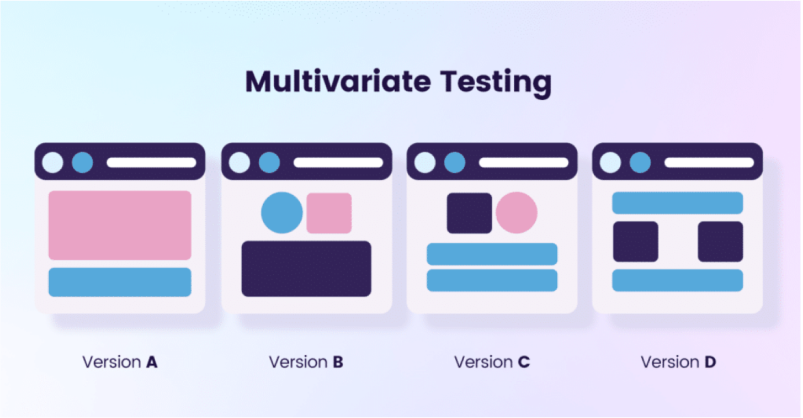
Multivariate testing allows you to test multiple elements on a page simultaneously. For instance, you might test combinations of headlines, button colors, and images at the same time.
How does it work?
- Each variation of an element is combined with variations of other elements to create multiple test versions.
- Adobe Target measures which combination performs the best.
Example:
Headline A with Button Color X and Image Y.
Headline B with Button Color Z and Image Y.
Value:
- Helps you understand how different elements interact.
- Best for interactions between page elements when the eligible audience is large enough to support all combinations.
For example, two headlines × two images × two CTA labels create eight combinations. Adobe Target uses full-factorial MVT, so adding variations increases the traffic needed. Use its MVT Traffic Estimator to check feasibility. If the audience is too small, reduce combinations or run a simpler A/B test.
3. Auto-Allocate Testing:
Auto-Allocate uses a multi-armed bandit approach to direct more traffic toward better-performing experiences while continuing to explore alternatives.
How does it work?
- Traffic allocation adapts after enough visitors and conversions have been collected for the experiences.
- As Adobe Target gathers performance data, it increases the traffic to the version that’s driving better results.
- A winning experience receives more traffic, while other experiences continue receiving some traffic for exploration.
For example: You launch two versions of a product page with different layouts. Auto-allocate testing automatically pushes more traffic to the layout that drives more purchases, helping you optimize results in real-time.
Value:
- Maximizes conversions during the test itself by favoring the high-performing version.
- Can improve conversions during the activity by directing more visitors toward stronger experiences.
- Use the Auto-Allocate winner indicator and reporting guidance rather than applying a manual A/B stopping rule.
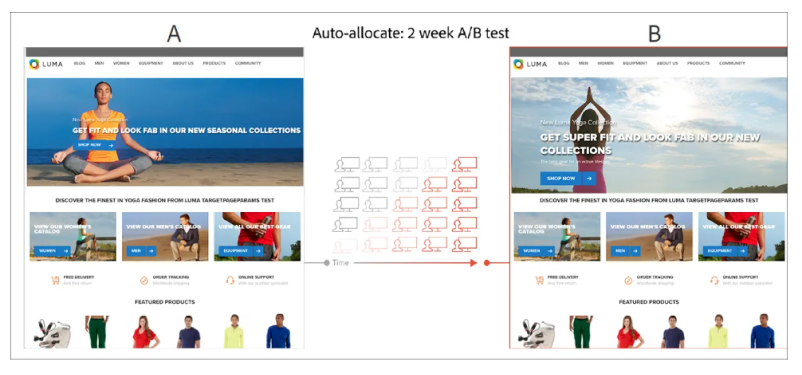
A two-week example of an A/B test using the auto-allocate method
4. Auto-Target Testing:
This advanced method uses machine learning to personalize experiences for individual users. Instead of a one-size-fits-all approach, the system analyzes user behavior and serves the most relevant content to each person, enhancing engagement and satisfaction.
How does it work?
- Adobe Target analyzes user data (like location, behavior, and device type).
- Based on this data, it delivers the most relevant version to each user.
- The system continuously learns and adapts to improve the targeting accuracy.
- For example, Auto-Target might select different marketer-defined homepage experiences for visitors with different profiles and behaviors. Auto-Target requires Target Premium.
Why It’s Valuable:
- Ensures every visitor gets the experience most relevant to them, boosting engagement and satisfaction.
- Reduces guesswork by allowing AI to optimize experiences on the fly.
- Particularly useful for large-scale websites with diverse audience segments.
5. Audience-Specific A/B Testing
Audience-specific testing is a way to design an A/B activity, rather than a separate native activity type. Compare control and variant experiences within the same eligible audience, such as:
- First-time visitors
- Returning customers
- Users from specific regions
How Does It Work?
- Define Audience Segments:
- Create rules in Adobe Target to define segments based on specific criteria like behavior, location, device, or visit history. For example:
- First-time visitors: Visitors with no prior interaction on your website.
- Returning customers: Users who have made previous purchases or have logged in.
- Users from specific regions: Visitors from targeted geolocations like India, Europe, or the US.
- Design Tailored Experiences:
- Create different versions of your webpage or app for each segment. For instance:
- For first-time visitors, show a pop-up with a special welcome discount.
- For returning customers, display personalized product recommendations based on their past purchases.
- For users in specific regions, showcase region-specific offers or content in their local language.
Run the Test:
Within each eligible segment, visitors are assigned to the control or a variant, and Adobe Target collects data to compare their performance. Showing only one different experience to each segment does not establish which experience caused an improvement.
Analyze Results:
The test provides insights into what resonates with each audience group, helping you refine your strategies to optimize the experience for all visitors.
Value:
- Delivers more granular insights by focusing on specific user groups.
- Ensures optimized experiences for different audience segments.
Which Adobe Target A/B Testing Type Should You Use?
For quick, simple tests: Manual A/B testing is best.
For testing multiple changes at once: Multivariate testing is your go-to.
To direct more traffic toward a stronger experience during a test: Use Auto-Allocate, which uses a multi-armed bandit approach.
To personalize among several experiences: Use Auto-Target with Target Premium. To compare variants for a defined segment: Use an audience-targeted A/B activity.
Key Strategies for A/B Testing in Adobe Target: Best Practices Included
Conducting A/B tests with Adobe Target can be straightforward and insightful. Here are some A/B testing strategies you can implement with Adobe Target:
Set Clear Objectives
Decide what you want to achieve with your test. Are you aiming for more people to sign up for a newsletter, spend more time on a page, or complete a purchase? Having a clear goal will guide your testing process.
If your goal is to increase newsletter sign-ups, you might aim to boost the conversion rate on your landing page from 5% to 8% over a month.
Focus on One Change at a Time
To isolate the effect of one element, change only that element. You can also use an A/B test to compare complete page designs, but the result then applies to the combined experience. Use MVT when you need to understand how individual elements interact.
You might test two headlines: "Discover Our New Features" versus "Learn More About Our Latest Updates." By changing only the headline and keeping other elements constant, you can determine which one resonates more with your audience.
Create Your Test Versions
Develop the original version (often called the "control") and a new version with the change you're testing. For instance, if you're testing button colors, have one page with a blue button and another with a green one.
You could test the color of your "Subscribe" button by comparing a blue button in the control version to a green button in the variant. This helps you see which color encourages more sign-ups.
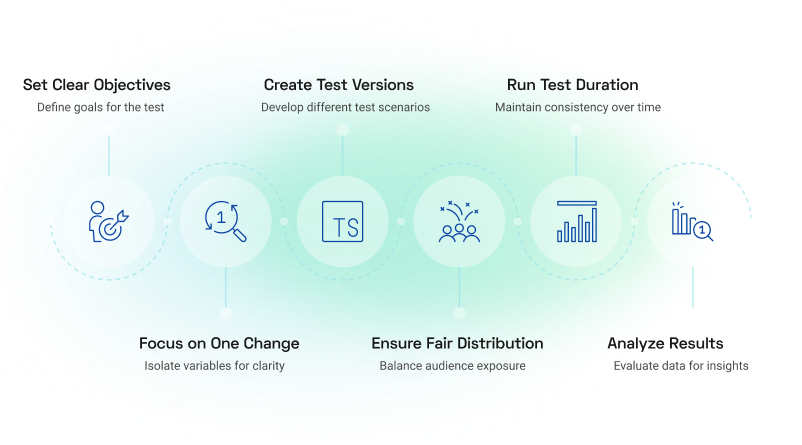
Ensure Fair Audience Distribution
Make sure both versions are shown to similar groups of visitors. This ensures that any differences in results are due to the change you made, not because of varying audience characteristics.
For a manual website A/B test, define the eligible audience and keep the planned traffic allocation stable. Check unexpected imbalances in visitor counts before interpreting the result.
Run the Test for an Appropriate Duration
Plan the required sample size and duration before launch using eligible traffic, baseline conversion rate, and the smallest lift worth detecting. Ending a manual A/B test as soon as significance appears can increase the risk of a false positive.
Cover relevant business cycles and reach the planned sample size. Two weeks is not a universal rule, especially for low-traffic pages or outcomes with long conversion delays.
Analyze the Results
After the test concludes, look at the data to see which version performed better. Did the change lead to more sign-ups or sales? Use these insights to inform future decisions.
If the green produces a reliable 10% relative lift in completed sign-ups, review lead quality and guardrail metrics before rolling it out.
How to Use the Adobe Target Sample Size Calculator
Open the Sample Size Calculator from the Activities menu. Select the tab that matches your reporting source, then enter eligible daily traffic, the number of offers including the control, baseline conversion rate, and the relative lift you want to detect. Review confidence and power settings where available and account for multiple comparisons when testing several offers against a control.
A 10% relative lift on a 5% baseline conversion rate means a target rate of 5.5%, an increase of 0.5 percentage points. Smaller lifts usually require more observations. Use the calculator output to plan a manual A/B test, not as proof that an observed result is already significant.
Before declaring a winner, check the planned sample size, uncertainty around the lift, conversion delays, and guardrails such as lead quality, revenue, or page errors. Confidence is not the probability that a particular variant is the best. A test that misses its evidence threshold may be inconclusive.
Identifying Key Metrics and KPIs to Measure Success
Conversion Rates: Track the percentage of users who complete a desired action, such as making a purchase or signing up for a newsletter. This is a primary metric for evaluating test performance.
Click-Through Rates: Measure the percentage of users who click on a specific element, like a call-to-action button. This helps determine the effectiveness of different designs or messages.
Average Session Duration: Monitor how long users stay on your site or app. A longer session duration can indicate better engagement with your content.
Accurate Tracking: Analytics for Target (A4T) lets you use Adobe Analytics supported Target activities. Validate experience exposure, visitor identity, the selected report suite, and conversion events before launch. An integration alone does not guarantee accurate measurement.
Baseline Data: Establish a baseline by collecting data on your current performance before implementing changes. This provides a reference point for measuring the impact of your tests.
Keep Testing and Learning
A/B testing is an ongoing process. Even after finding a change that works, continue testing other elements to further improve your website's performance.
After optimizing your button color, you might next test different images or messaging to see what further enhances user engagement.
Embarking on A/B testing with Adobe Target is like turning on a spotlight in a dimly lit room, revealing clear paths to enhance your digital strategies. By systematically experimenting with various elements of your website or app, you gain invaluable insights into user preferences, leading to more informed decisions and improved user experiences.
For instance, BBVA Bank utilized Adobe Target to conduct over 1,000 split tests, resulting not only in a 20% increase in their customer base but also in a significant boost in online banking adoption.
Conclusion
Experts also emphasize the importance of continuous testing and optimization. Regular A/B testing allows businesses to adapt swiftly to changing user behaviors and preferences, ensuring that digital experiences remain relevant and engaging.
By embracing Adobe Target's advanced A/B testing capabilities, you're not just making educated guesses; you're leveraging data-driven insights to craft experiences that resonate with your audience.
This proactive approach not only enhances user satisfaction but also drives significant improvements in key performance metrics, setting your business on a path to sustained growth and success.
Looking for Adobe Implementation Services? We deliver tailored solutions for AEM, Adobe Analytics, and Adobe Target, helping you achieve a smooth transition to better customer engagement.
Frequently Asked Questions
1. Is Adobe Test & Target the same as Adobe Target?
Adobe Test & Target is the former name of Adobe Target. The current product supports A/B testing, multivariate testing, and personalization across websites, apps, and other supported digital experiences.
2. How do I set up an A/B test in Adobe Target?
First, confirm that Adobe Target is implemented on the page. Select Create Activity > A/B Test, create your control and alternative experiences, define the audience and traffic allocation, and choose your success metric. Preview each experience and validate conversion tracking before activating the test.
3. What is the difference between A/B testing and multivariate testing in Adobe Target?
A/B testing compares two or more experiences, such as different page layouts or headlines. Multivariate testing compares combinations of changes across several page elements to understand which combination performs best. Use A/B testing for a focused comparison and MVT when you need to evaluate how elements work together.
4. Does multivariate testing require more traffic than A/B testing?
Generally, yes. Multivariate testing divides visitors across more combinations. For example, two headlines, two images, and two CTA labels create eight experiences. Use Adobe Target’s MVT Traffic Estimator to assess whether your eligible audience can support the test. Reduce combinations if the traffic requirement is too high.
5. How do I calculate the sample size for an Adobe Target A/B test?
Use Adobe Target’s Sample Size Calculator to estimate the traffic required. Inputs include eligible daily visitors, baseline conversion rate, number of experiences, and the relative improvement you want to detect. Review the available confidence and statistical power settings. The result helps plan the experiment but does not establish that a test has produced a reliable winner.
6. How long should an Adobe Target A/B test run?
There is no fixed duration for every test. Plan the duration around your eligible traffic, baseline conversion rate, number of experiences, and minimum detectable improvement. For manual A/B tests, reach the planned sample size and cover relevant business cycles rather than stopping as soon as one variation appears ahead.
7. What is the difference between Auto-Allocate and Auto-Target?
Auto-Allocate directs more traffic toward better-performing experiences while continuing to test alternatives. Auto-Target uses machine learning to select experiences for individual visitors based on their profiles and behavior. Choose Auto-Allocate to favor an overall winner and Auto-Target for personalized experience selection. Auto-Target requires Target Premium.
Ashvini SK
Senior Content Writer
Xtelligence Inbox.
Your weekly dose of marketing smarts!
Related Posts