Interactions Correctly?


Top 5 Salesforce Automation Tools for Smarter Workflows in 2026


Get a Proven Audit to Evaluate Your Automation Stack
Let’s get straight to it: Salesforce automation helps teams manage sales, marketing, service, and customer data with less manual effort. In 2026, Salesforce automation is moving beyond simple task execution toward intelligent, connected workflows powered by Flow, Agentforce, Data 360, and automation orchestration.
What sets Salesforce apart is its ability to combine CRM data, low-code automation, AI agents, approvals, and custom development within one connected platform.
The right Salesforce automation tools can capture and route leads, update records, trigger personalized engagement, coordinate approvals, assist employees, and activate customer data in real time.
This reduces repetitive work while helping teams respond faster and deliver more consistent customer experiences. From auto-generating reports to nurturing leads, these automation tools in Salesforce streamline processes, reduce errors, and boost productivity.
Whether it's lead tracking, customer interactions, or data management, these automation tools for Salesforce do the heavy lifting while delivering actionable insights to keep you ahead of the curve.
With countless options available, picking the right tools can feel overwhelming. Don’t worry we’ve got you. In this guide, we explore five Salesforce automation tools and capabilities that are especially relevant in 2026, including Salesforce Flow, Flow Orchestration, Agentforce, Apex, and Data 360-powered automation.
What is Salesforce Automation?
Salesforce automation is a technology solution that automates repetitive, manual tasks across the entire sales lifecycle from lead generation to deal closure, using advanced salesforce automation software. Traditional automation follows defined rules and conditions. Modern Salesforce automation can also use real-time customer data and AI agents to recommend or execute the next best action, while routing complex cases to employees when human judgment is required. By automating lead assignment, follow-ups, pipeline updates, approvals, service routing, reporting, and customer engagement, organizations can create more consistent processes, improve productivity, and build a scalable operating model.
Traditionally, sales teams spend a significant portion of their time on non-selling activities like updating spreadsheets, sending follow-up emails, scheduling meetings, or generating reports. These tasks, while necessary, do not contribute directly to closing deals. SFA solves this challenge by creating automated workflows that handle these repetitive tasks without human intervention.
For example, the system can automatically assign leads to the right salesperson, trigger follow-up emails at the right intervals, and update opportunity status in the sales pipeline all without the sales rep lifting a finger.
What Does Salesforce Automation Do?
It typically automates tasks like:
- Lead Management – Capturing, assigning, and nurturing leads.
- Contact Management – Storing and organizing customer information.
- Opportunity Tracking – Monitoring sales opportunities through different stages.
- Sales Forecasting – Predicting future sales based on historical data.
- Task & Calendar Management – Automating follow-ups, reminders, and meetings.
- Order & Quote Management – Generating price quotes and processing orders.
- Email Automation – Sending personalized emails at different stages of the sales funnel.
- Reporting & Analytics – Generating performance reports and insights.
Why Salesforce Automation Matters in 2026
In 2026, Salesforce automation is becoming more intelligent, connected, and outcome-focused. Businesses are combining Flow, Agentforce, Data 360, Slack, and external integrations to automate not only repetitive tasks but also customer and employee workflows.With a growing volume of leads, faster deal cycles, and higher expectations for results, manual processes simply can’t keep up.
Salesforce automation helps teams act on real-time signals, route work to the right person or AI agent, automate approvals, personalize customer interactions, and maintain consistent data across departments.This minimizes bottlenecks and ensures continuous progress throughout the sales journey.
Beyond just improving efficiency, automation fosters consistency across all team activities. By seamlessly integrating with everyday tools like email, calendars, and messaging apps, it ensures smooth, uninterrupted workflows.
As teams scale, automation governance becomes just as important as automation speed. Organizations need clear ownership, testing, permissions, monitoring, human escalation paths, and reliable customer data to make AI-assisted automation safe and effective.Allowing your team to focus on what truly matters: closing deals and building lasting relationships.
Looking to Get More Out of Your Salesforce Investment?
Xerago helps businesses fine-tune existing Salesforce environments, closing gaps in automation, cleaning up unused Flows, and connecting disconnected workflows. As a Salesforce partner, Xerago supports ongoing platform optimization and managed services, helping teams get more value from what they've already built.
Talk to Xerago about optimizing your Salesforce setup.What Are Salesforce Automation Tools?
Salesforce automation tools are software features that help businesses make their work easier and faster within the Salesforce CRM platform.`
These tools are designed to handle routine tasks, so teams don’t have to do everything manually. By using Salesforce automation tools, companies can organize their work better, save time, and improve how they manage sales, marketing, and customer data.
For example, workflow automation tools in Salesforce take care of repetitive tasks, like sending reminders or updating records, so teams can focus on more important work, like closing deals or building stronger relationships with customers.
These marketing automation tools help businesses create personalized experiences for customers by optimizing marketing campaigns, social media posts, and lead follow-ups.
When businesses use these tools, they don’t just work more efficiently—they also get a clearer view of their sales and customer interactions. This means they can make better decisions, improve customer experiences, and grow their business more effectively.
What Can You Automate With Salesforce?
Salesforce is packed with automation features that help simplify everyday tasks, improve efficiency, and free up your team to focus on more strategic work. Here’s what you can automate with Salesforce:
- Lead Management: Automatically assign leads, send follow-up emails, and prioritize prospects with lead scoring.
- Workflow Approvals: Streamline workflows with Salesforce, simplify approval processes and keep teams informed with automated notifications.
- Data Management: Bulk update records, clean customer data, and reduce manual errors.
- Email Campaigns: Personalize and schedule emails, automate drip campaigns, and nurture leads seamlessly.
- Task Tracking: Create follow-up tasks and sync emails, calendars, and meetings effortlessly.
- AI-assisted service: Classify cases, recommend responses, summarize records, resolve routine requests, and escalate complex issues to service employees.
- Reports and Dashboards: Generate reports automatically and monitor performance in real time.
- Marketing Activities: Automate social media posts, monitor engagement, and score leads for the sales team.
- Sales Pipelines: Automate deal updates, set reminders, and track contract renewals.
- Notifications and Alerts: Get real-time alerts for lead actions, deadlines, and account updates.
Types of Automation in Salesforce
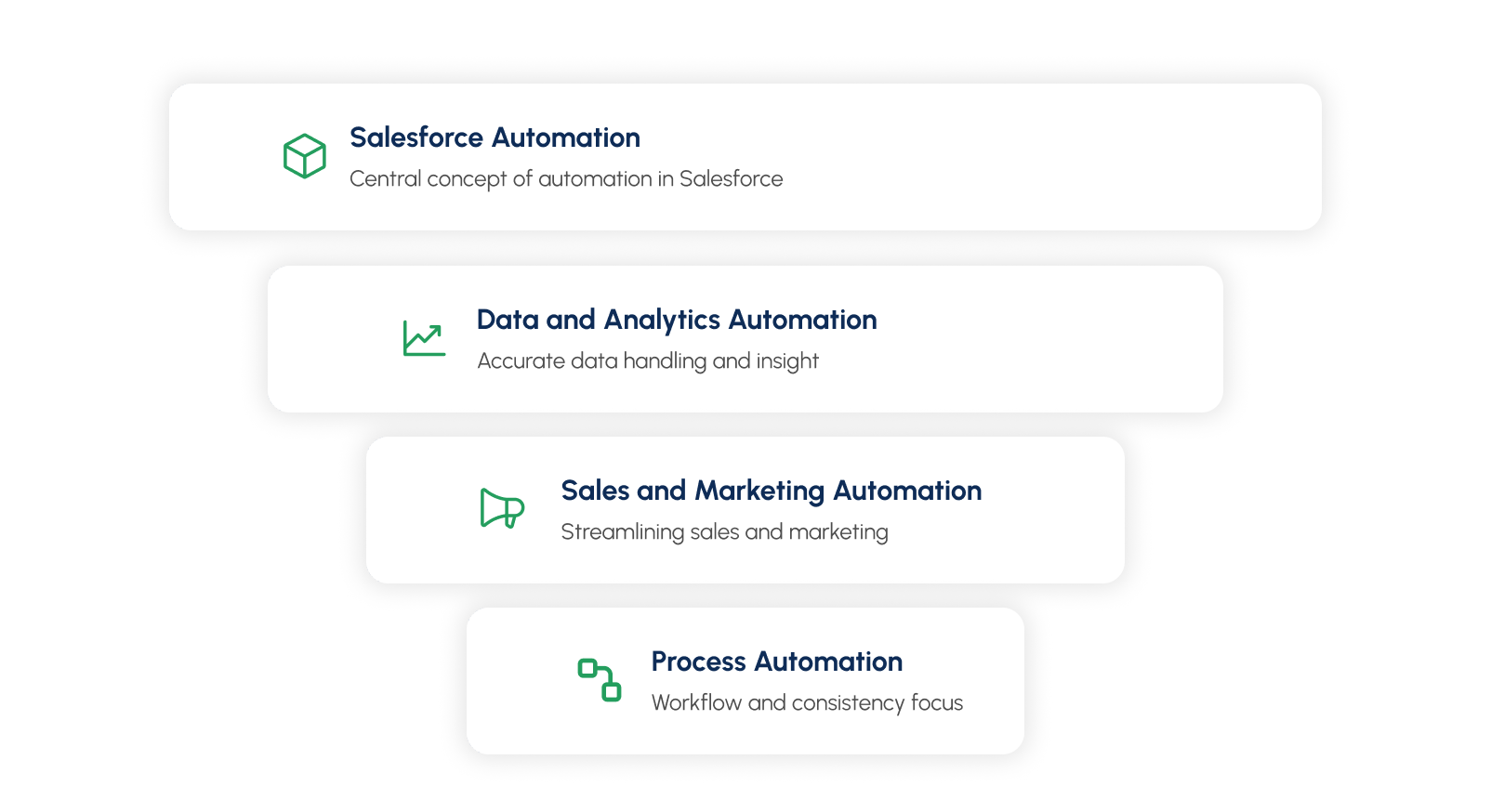
Salesforce automation can be broadly classified into three main categories based on the areas it impacts:
- Process Automation: This category focuses on workflow automation using Salesforce and business processes to save time and ensure consistency.
- Sales and Marketing Automation: These tools streamline sales cycles and enhance marketing efforts by automating tasks related to customer interactions and lead management.
- Data and Analytics Automation: This category focuses on ensuring accurate data handling and providing actionable insights through automation.
Top 5 Salesforce Automation Tools to Work Smarter in 2026
Salesforce automation in 2026 combines low-code workflows, AI agents, business-process orchestration, custom development, and real-time customer data. The best tool depends on whether you need to automate a record update, coordinate a complex process, support an employee with AI, extend Salesforce with code, or activate data across customer journeys.
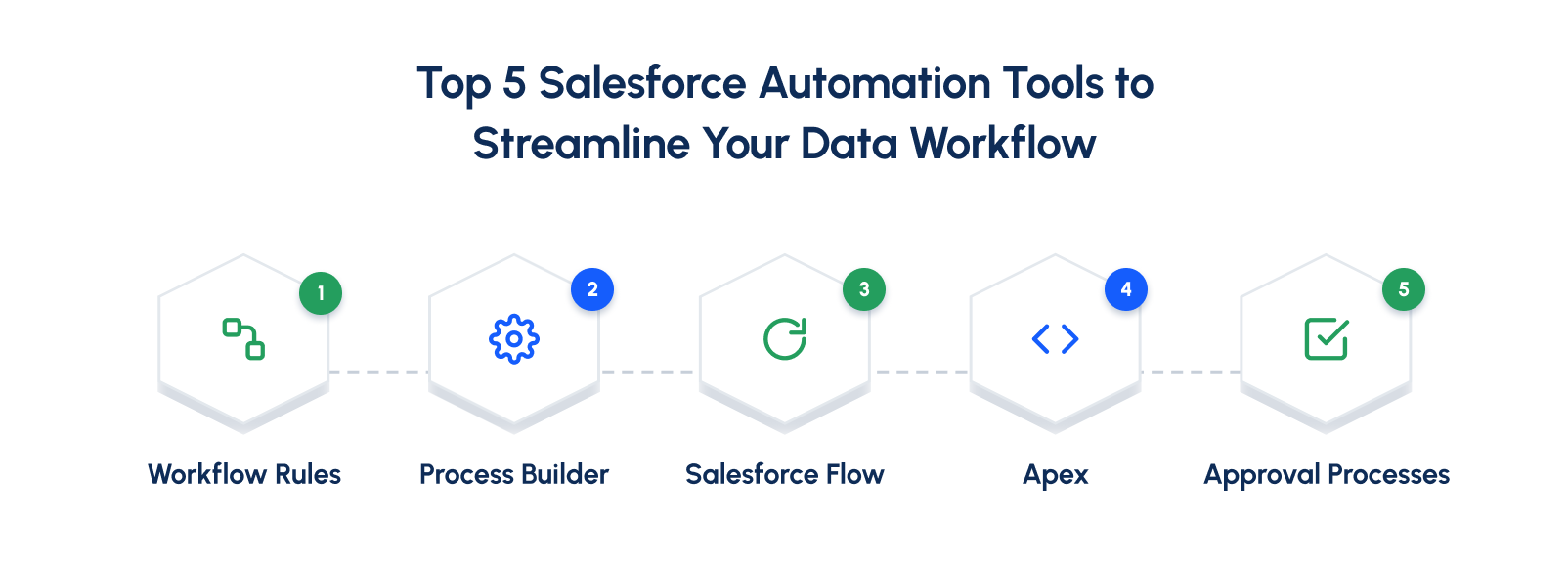
Let’s look at these tools in detail.
1. Salesforce Flow – The Core Automation Tool
Salesforce Flow is the primary low-code automation tool for creating record-triggered, scheduled, screen-based, and background workflows. Teams can use Flow to update records, create tasks, send notifications, collect information, call reusable subflows, and connect business processes without writing code. Best for: Lead routing, record updates, guided user journeys, notifications, approvals, data processing, and internal workflows.
Key Features:
- Automated Alerts: Workflow Rules in Salesforce let you set up automatic notifications to keep your team informed. For example, you can create a rule that sends an email to the sales manager every time a new high-priority lead is assigned.
- Task Creation: Workflow Rules can automatically create tasks for your team based on specific conditions. For instance, you can set a rule to generate a follow-up task for a sales rep whenever a lead's status changes to "Contacted."
- Field Updates: With Workflow Rules, you can automatically update fields in Salesforce when certain conditions are met. For example, if a lead meets specific criteria, you can set a rule to update their "Lead Status" to "Qualified."
- Outbound Messages: Workflow Rules can also send messages to other systems or services outside Salesforce. For example, you can create a rule that sends a message to your billing system every time a new customer account is created in Salesforce.
Grow Your Business with Salesforce Automation
Whether you're just starting out or scaling fast, Xerago's Salesforce expertise is here to help.
Talk to Xerago Expertise2. Process Builder - Coordinating Complex Workflows
Process Builder is a visual tool in Salesforce that helps you create and manage automated business processes without writing any code.It's one of the most flexible automation tools in Salesforce for managing conditions and actions across multiple objects.
You just define the criteria and actions you want, and the Process Builder takes care of executing them whenever the conditions are met. With Process Builder, you can set up tasks like updating records, sending email notifications, assigning tasks, and more, all based on specific conditions.
Key Features:
- Visual Interface: Process Builder makes creating automation simple with its drag-and-drop interface. You can visually lay out your business processes, map out the flow of actions, and clearly see how everything connects.
- Multiple Criteria Nodes: Within a single process, you can set up multiple criteria nodes to handle different conditions and actions. Think of it as creating a decision tree where each branch evaluates specific conditions and takes the right action based on what it finds.
- Time-Based Actions: With Process Builder, you can schedule actions to happen at specific times. For example, you might set it to send a follow-up email one week after a lead is created. This feature is perfect for workflows that need certain activities to occur later or on a specific schedule.
- Integration Capabilities: Process Builder can connect with other systems, making it easy to share information or trigger actions outside of Salesforce. For example, it can send outbound messages to external tools or use custom Apex code to interact with APIs.
How Process Builder Works:
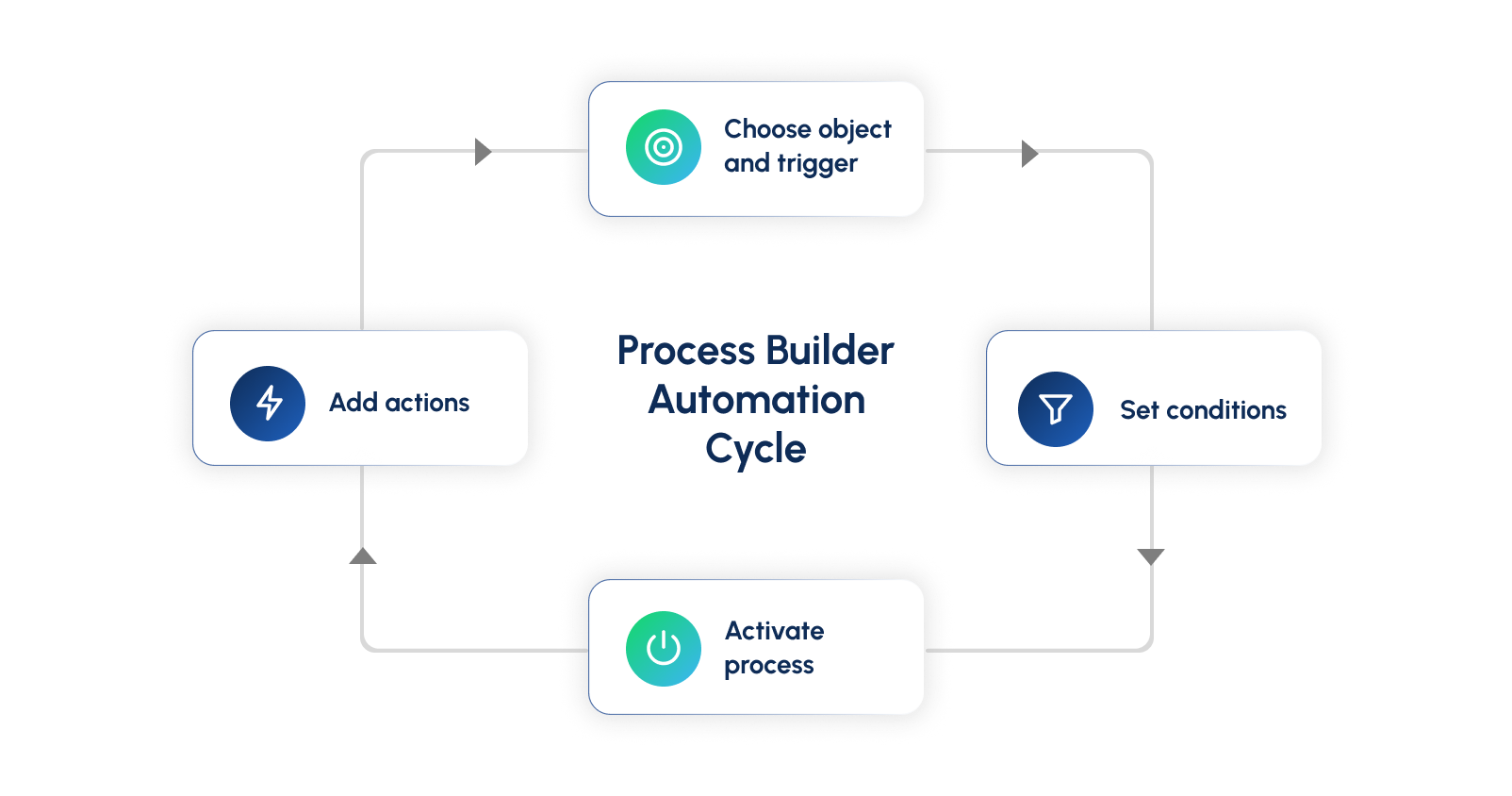
- Choose the Object and TriggerStart by picking the Salesforce object the process will work with (like Opportunities or Leads). Next, decide when the process should begin.
- Set the ConditionsDefine the rules that need to be met for the process to run. For instance, you could set a condition to check if an opportunity amount is more than a certain value, like $100,000.
- Add the ActionsDecide what should happen when the rules are met. For example, if the opportunity amount is above $100,000, you could create a task for the sales manager and send them an email notification.
- Activate the ProcessOnce everything is set up and tested, turn on the process. From then on, it will run automatically whenever the conditions you’ve defined are met.
A Few Automation Tasks You Can Perform with Process Builder
Process Builder allows you to automate key tasks by defining criteria and triggering specific actions when those criteria are met.
Some of the most commonly used actions include:
- Create Records: Automatically create new records in any Salesforce object.
- Update Records: Update fields on the record that triggered the process or related records.
- Send Email Alerts: Automatically send email notifications to users or external recipients.
- Post to Chatter: Post messages to Chatter feeds to keep team members informed.
- Invoke Apex Code: Execute custom Apex code for advanced automation needs.
- Submit for Approval: Submit records for approval processes.
- Call Other Processes: Invoke other processes to create modular and reusable automation components.
Advantages of Using Salesforce Process Builder
- No Coding Required: The drag-and-drop interface allows for powerful automation without writing code.
- Visual Interface: Easily map and visualize business processes and logic.
- Multiple Criteria & Actions: Handle various conditions and execute multiple actions in a controlled order.
- Modular Automation: Call other processes for reusable and manageable automation components.
- Time-Based Actions: Schedule actions like reminders or follow-ups for long-term workflows.
- Integration Capabilities: Connect with external systems via outbound messages or Apex code.
- Scalable & Reusable: Easily expand automation and control complex workflows with reusable modules.
- Improved Efficiency: Automates routine tasks, freeing time for strategic focus.
3. Agentforce – AI-Powered Salesforce Automation
Agentforce brings AI agents into Salesforce workflows. Depending on permissions and configuration, agents can answer questions, summarize information, recommend next steps, complete routine tasks, and hand off complex cases to employees.
Agentforce should not be presented as a replacement for every Flow. Use Flow for predictable, deterministic processes and Agentforce when the workflow requires natural-language interaction, contextual reasoning, or flexible task execution.

AI agents should handle context-driven decisions, such as understanding customer intent, recommending next-best actions, or triggering routine actions within defined guardrails.
Critical rules around eligibility, approvals, permissions, compliance, financial limits, and sensitive data should remain deterministic in Salesforce Automation. For example, AI may recommend a retention offer, but Salesforce should control eligibility, discount limits, and approval requirements.
The right approach is risk-based: AI provides intelligence and flexibility, Salesforce provides control and governance, and humans handle exceptions.

Key Features:
- Decision Elements: These allow you to incorporate conditional logic into your flows. You can create branches in your flow based on the values of fields, which enables the automation to make decisions dynamically.
- Screen Elements: For Screen Flows, you can create interactive screens to collect or display data. These elements can include input fields, checkboxes, radio buttons, and more.
- Data Operations: Flows can perform Create, Read, Update, and Delete (CRUD) operations on Salesforce records. This includes creating new records, updating existing records, and deleting records as needed.
- Loops: This feature allows you to iterate over a collection of records and perform actions on each item individually. Loops are useful for batch processing or handling multiple related records.
- Subflows: Subflows enable you to modularize your automation by calling other flows within a flow. This promotes reuse and simplifies complex automation by breaking it down into manageable parts.
- Integration with Apex: For advanced use cases, flows can call Apex classes. This allows you to extend the functionality of flows with custom code when necessary.
4. Apex and Invocable Actions – Custom Automation at Scale
Apex is appropriate when declarative tools cannot meet the required business logic, performance, transaction, or integration needs. Developers can use Apex triggers, Queueable Apex, Scheduled Apex, APIs, and Invocable Actions to extend Flow and connect Salesforce with external systems.
Use Apex selectively. Start with Flow where possible, then use Apex for complex logic, high-volume processing, reusable services, and advanced integrations,to the platform. It’s designed to handle tasks like updating records when something changes, performing actions when a button is clicked, or controlling how custom pages work.
Apex works a lot like Java, so it’s easy to pick up if you’re familiar with that language. It also connects directly with Salesforce’s database, which makes it great for building advanced workflow management or connecting Salesforce with other systems.
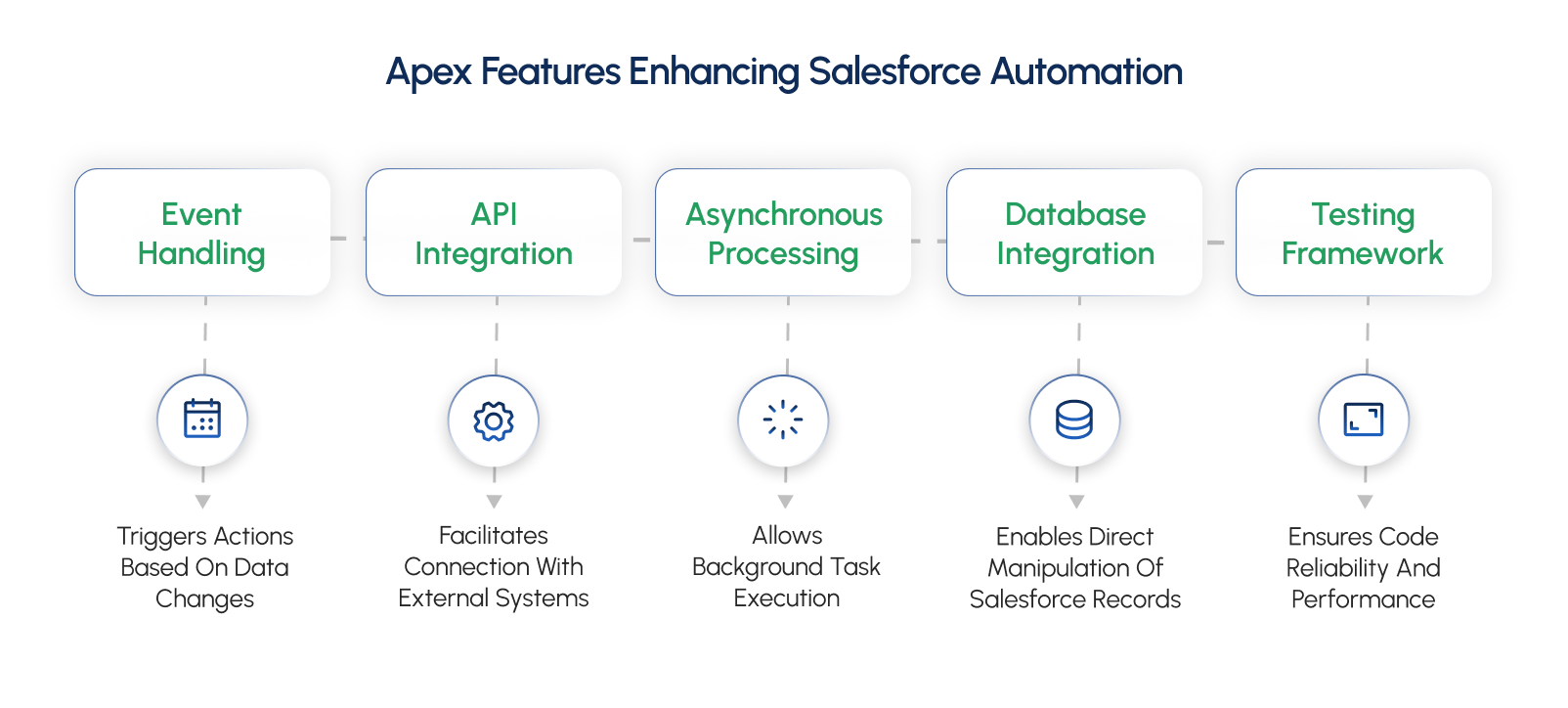
Key Features:
- Database IntegrationApex lets you work directly with Salesforce’s database using code. You can easily create, read, update, or delete records without much hassle. It supports simple tools like DML (Data Manipulation Language) for managing data and SOQL (Salesforce Object Query Language) for finding specific information.
- Event HandlingApex can manage actions triggered by events like button clicks, updates to records, or custom activities. You can create “triggers,” which are small pieces of code that automatically run when certain changes happen in your data.
- Asynchronous ProcessingApex allows you to run tasks in the background using features like future methods, queueable Apex, or scheduled Apex.
- Testing FrameworkApex comes with built-in tools for testing your code to ensure everything works as it should. Salesforce also has a rule that requires 75% of your Apex code to be tested before it can be used in production.
- API IntegrationApex lets you connect Salesforce with other systems by working with APIs. You can send and receive information from external services, such as websites or apps, directly within Salesforce.
5. Data 360 and Real-Time Automation
Data 360 helps bring together customer and business data so Salesforce can respond to real-time events and signals. These signals can trigger Flows, Agentforce actions, sales tasks, service responses, or personalized marketing engagement.
Example: A high-value customer showing renewal risk could trigger an alert for an account manager, a personalized retention journey, and an Agentforce-generated recommendation for the service team.
Approval processes ensure that business-critical decisions follow a structured, documented path and are reviewed by the appropriate stakeholders.
Key Features:
- Multi-Step Approvals: Approval processes can be configured with multiple steps, allowing different levels of approval for different types of records or stages in the process. For example, a contract exceeding a certain value can always be routed to a senior executive.
- Approval Actions: You can define actions that occur at each step of the approval process. These actions can include updating fields, sending email notifications, creating tasks, or even triggering additional automation like workflow rules or processes in Process Builder. This transparency is crucial for compliance, especially in finance or healthcare.
- Delegate Approvals: Approvers can delegate their approval responsibilities to other users so that the process continues smoothly even when the primary approver is unavailable. Approval processes can handle these multi-step approvals, ensuring that key decisions are reviewed by multiple stakeholders before they are finalized
- Automatic Approval/Reject: You can set criteria for automatic approval or rejection of records without requiring manual intervention. Tasks like sending notifications, updating records, and even triggering other processes (such as creating tasks or generating documents) can be automated, ensuring nothing falls through the cracks.
- Customizable Approval Request Emails: Salesforce allows you to customize the email templates sent to approvers to make sure the necessary context and instructions are clear. This tailored communication helps clarify expectations and reduces the chances of delays or incorrect approvals.
- Approval History Tracking: The entire history of the approval process, including each step and the outcome, is tracked and can be reviewed. The ability to review approval histories and decisions provides a safeguard against improper approvals, reducing the risk of fraud or compliance violations.
Comparison of Salesforce Automation Tools
| Tool | Primary purpose | Best Suited For | Technical level |
|---|---|---|---|
| Salesforce Flow | Automate predictable tasks and workflows | Record updates, lead routing, guided screens, notifications | Low-Code |
| Flow Orchestration | Coordinate multi-step business processes | Approvals, onboarding, renewals, cross-team work | Low-code to moderate |
| Agentforce | Automate contextual tasks and interactions | AI assistance, service, sales support, employee workflows | Configuration plus governance |
| Apex and Invocable Actions | Extend Salesforce with custom logic | Complex rules, integrations, bulk processing | Developer-led |
| Data 360 automation | Activate real-time customer and business data | Personalization, event-driven journeys, customer intelligence | Moderate to advanced |
Best Practices for Salesforce Automation
Mastering Salesforce automation involves thoughtful planning and execution. Here’s a guide to help you build efficient and reliable automated workflows:
- Analyze Before AutomatingTake a close look at your current manual processes. Document them to understand their flow and identify areas where automation can save time, reduce errors, or improve efficiency.
- Map Out Your AutomationCreate detailed process maps to visualize your workflows. This helps refine your automation, anticipate issues, and discover opportunities for reusable actions, making future automation faster and easier.
- Simplify Your WorkflowsFocus on creating one streamlined process instead of multiple overlapping ones. A single, well-organized workflow is easier to troubleshoot and keeps your system more efficient.
- Optimize External Data HandlingWhen integrating with external data sources, use scheduled actions instead of triggers. Scheduled actions offer greater flexibility and stability, especially if there’s an issue with the external system.
- Design for ScalabilityPlan your automation with growth in mind. Use modular designs and reusable components to accommodate changes and expansions without reworking your entire system.
Conclusion
Salesforce automation can reduce repetitive work, improve data consistency, accelerate customer response times, and coordinate work across sales, marketing, service, and operations. In 2026, the strongest automation strategies combine predictable Flow-based processes with Agentforce, Flow Orchestration, Apex, and real-time customer data. The specific tool you choose will depend on the complexity of your automation needs.
Use Salesforce Flow for core low-code automation, Flow Orchestration for complex business processes, Agentforce for contextual AI assistance, Apex for custom logic, and Data 360 for real-time data activation. Treat Workflow Rules and Process Builder as legacy automation that may need review and migration, to optimize your workflows.
By understanding the features and functionalities of each tool, you can make informed decisions about implementing automation in your organization.
Not Sure What's Actually Working in Your Salesforce Setup?
Xerago audits existing Salesforce environments to identify redundant automations, broken Flows, and gaps between what's built and what the business actually needs. As a Salesforce partner, Xerago turns that audit into a clear, prioritized roadmap.
Talk to Xerago About Your Salesforce NeedsRam Prabhakar
Head of Solutions and Content
Xtelligence Inbox.
Your weekly dose of marketing smarts!